Continuing the theme started with What's on your Pod? and What's on your Mac? I humbly submit this list of browser add-ons that I use. For those not familiar with the technology, a browser add-on (or plugin or extension) is a small piece of software that works within the framework of the underlying platform (a web browser in this case) to provide some piece of additional functionality or change the way part of the browser looks or feels. By their nature, add-ons are typically small in size and single purpose. In fact the best add-ons, in my opinion, do only one thing and do it well.
It wasn't long ago that if you wanted to plug extra functionality into your browser your only option was Firefox. In fact, I'm still primarily a Firefox user today because of the richness of the add-ons available for this platform. I really like Safari (especially its Reader function) and I like Chrome's speed and skins. Both have outstanding HTML5 support as well. However, unlike recently, neither of them supported add-ons (although both do now). The moment I can get equivalent add-ons (extensions) for Safari to those below I will likely make a permanent browser switch.
The list below is simply the list of Firefox add-ons that I use or have used recently. It is by no means an exhaustive list of the popular add-ons available. For that, you'll have to go take a look for yourself. Before I start the list, you might be curious whether or not you are running any add-ons. In Firefox, pull down the Tools menu and select "Add-ons". This will pop up a window where you can see the list of Extensions (add-ons that provide new features), Themes (add-ons that change how your browser looks and feels), Personas (add-ons that make the browser pretty), and Plugins (add-ons that provide additional content support such as video formats). I'm going to list my favourite Extensions.
1Password - This browser extension goes hand-in-hand with the excellent 1Password application that I use on my Macs. Go to a site and 1Password will fill in the username and password for you. Supported on all major browsers.
AdBlock Plus - Essential extension that seamless scrubs out banner ads. AdBlock maintains its own database which you can extend as you go.
Canadian English Dictionary - I need the letter u in all my favourite, colourful, neighbourhood words.
Download Statusbar - This is one of the first extensions I installed way back. I've tried other download enhancers but I keep coming back to Download Statusbar. It does its one job and it does it well.
Evernote Web Clipper - This is another extension that goes hand-in-hand with an essential desktop application. In this case it is Evernote, the essential brain extension.
Firebug - If you do any web development Firebug is an essential debugging tool. Also allows editing and viewing of CSS, HTML, Javascript, etc.
Firefox Sync - Powerful search engines like Google and Bing have nearly obviated the need for bookmarks. However, I do have a small set that represent the most frequently visited sites that I go to. Firefox Sync (formerly Weave) does a decent job ensuring that no matter what machine I'm not, the instance of Firefox there will have my usual set of bookmarks. It also syncs passwords, preferences, and tabs. The latter is a little clunky though IMO.
FireGestures - FireGestures enables you to navigate your browser and web pages using swipes and other mouse gestures rather than clicking on different parts of the browser. To be honest my Macbook Pro's multitouch trackpad with jitouch installed removes the need for FireGestures. However, I still find it useful on my iMac. Windows and Linux users will love it as well.
Forecastfox Weather - This extension puts some discrete weather icons in the bottom right corner if your browser window. Over time my eyes have been trained to respond to the word/thought "weather" by glancing to the bottom right corner of my browser window. This is one of the reasons why it is jarring for me to use another browser.
Tab Mix Plus - If I was stranded on a desert island and could only take one Firefox extension with me it would be Tab Mix Plus. Sure, all browsers now support tabs but Tab Mix Plus provides many more configuration options and has excellent save/restore functions.
FireTitle (MIA) - FireTitle is one extension that went away after the Firefox 3.6 upgrade and I really wish it would come back. It allowed the user to set the window title text rather than using the default page title. I like to group similar tabs in different browser windows each with a topic title.
That's my list. What about yours? Do you know of equivalent extensions for Chrome or Safari? If so, I'd love to have some links.
Friday, September 3, 2010


Tuesday, August 31, 2010
How to create an HTML signature for Mac Mail
I recently updated my green signature and have had some questions about how I coaxed Mac Mail to do what I want. My old green signature looked something like below.

This signature gets the job done but is a little wordy and too tall for my liking. So I went into Mac Mail's signature editor and was horrified to find just how bad it is for editing anything other than simple text. Undaunted, I did a little research and found that the signature in a Mac Mail message is nothing more than a snippet of HTML. Without too many Unnatural Acts it is possible to use any HTML snippet for your signature. My current signature looks like this.

I like the clean look and the familiar icons link you to exactly where you think they should. As an added bit of bling the green message changes colour and size when moused over.

When the user clicks on the link they are connected to my original "Keep it green" blog entry. So how did I coax Mac Mail to use this signature? Follow the steps below which I've cobbled together from multiple sources but most heavily from Wess Daniel's blog.

This signature gets the job done but is a little wordy and too tall for my liking. So I went into Mac Mail's signature editor and was horrified to find just how bad it is for editing anything other than simple text. Undaunted, I did a little research and found that the signature in a Mac Mail message is nothing more than a snippet of HTML. Without too many Unnatural Acts it is possible to use any HTML snippet for your signature. My current signature looks like this.

I like the clean look and the familiar icons link you to exactly where you think they should. As an added bit of bling the green message changes colour and size when moused over.

When the user clicks on the link they are connected to my original "Keep it green" blog entry. So how did I coax Mac Mail to use this signature? Follow the steps below which I've cobbled together from multiple sources but most heavily from Wess Daniel's blog.
- Create your sexy signature using the HTML editor of your choice (I use VI. You, quite likely, do not). Feel free to use CSS and scripts since most email readers include full HTML browser capabilities. Here is a sample HTML file based on my signature above. Any images or linked content must reside on a publicly accessible location since only the URLs (and not the images themselves) are transmitted in your email message. You'll notice from my sample that I use a Dropbox Public folder to store the images for my signature (all icons courtesy of IconDock.com).
- Once your signature looks the way you want load its HTML file in Safari. Safari has the capability to store your signature as a webarchive. Most other browsers and operating systems use MHTML to accomplish the same thing but Apple is Apple. So pull down the File menu in Safari and Save As a webarchive. Let's call it Sexy.webarchive for now.
- In Mac Mail, open Preferences (Cmd-, or Preferences in the Mail menu) and select the Signatures icon. Create a new signature and give it a name. This will create a temporary webarchive to hold your signature. You will replace this file shortly. [NOTE: Technically you don't have to create a new signature but this is the easiest way to identify the new signature for the next steps. You can reuse an existing signature and look in the plist file to figure out which one it is.]
- Drag the new signature to the mail accounts for which you'd like to use it and then quit Mac Mail.
- In Finder, go to ~/Library/Mail/Signatures. You will see one or more files with names that look something like FA158A16-3D64-4B25-8C2C-5CCF1D7B85CD.webarchive. The webarchive with the most recent date and time is the temporary signature you just created.
- In Finder, locate Sexy.webarchive and rename it to match the long filename of your temporary signature. Then copy or move your renamed signature file on top of the temporary signature.
- Restart Mail. Now you should see your new sexy signature when you compose new messages. If you're not seeing your new signature it could be that the signature is not associated with the mail account you are using (see step 4). It could be that you have more than one signature associated with your mail account and you need to select your new signature (use the Signature pull down menu on the right side of the composition window).
Monday, August 30, 2010
What's on your Mac?
Within the span of a week, two good friends of mine decided that it was time to switch from PC to Mac. I promised both of them a list of the Mac utilities and applications that I have found useful or interesting or fun on my Macs over the years. Before I start I need to give props to my buddy Scott Corscadden who took the time to school me in the Way of Mac when I made my switch some years ago.
1Password ($39.95) - This great utility keeps track of your passwords, log in ids, and form settings. It can also generate strong passwords which you access with your 1Password password. Integrates with all browsers. You can even store your encrypted 1Password file on a file sharing service like Dropbox so that all your Macs, iPhones, iPads can access the same passwords.
Adium (Free) - Are you an iChat or an MSN? An AOL or a GTalk? What about all your contacts? Do they all use the same instant message service that you do? With a product like Adium, it doesn't matter. Use Adium to log into multiple IM services at the same time in the same interface.
AppTrap (Free) - Uninstalling an application on a Mac is as simple as dragging it from Finder to your Trash bin. While this does uninstall the application it has a side-effect of leaving behind application support files such as configuration files, caches, databases. AppTrap will automatically detect an uninstall and, after prompting you for permission, delete all the support files for a clean uninstall. CAUTION: Some application upgrade processes consist of uninstalling the old version and reinstalling the new version. When doing an upgrade, select "Leave files" rather than "Move files".
Dropbox (Free) - There are a few cloud storage services out there (including iDisk from Apple). None are as seamless as Dropbox. Configure a directory to be your Dropbox and any file you put in there will automatically be synchronized on the server and with any other client you have pointing to your account. Share files seamlessly between your Macs, PCs, iPhones, iPads, Android phones, etc. The first 2 gig is free. 50 gig costs $9.99/month.
Evernote (Free) - One of my all time favorites. At first glance, Evernote seems like a regular text note taking tool. But you can also take photo notes (with OCR) and audio notes. Oh, and they're all seamlessly synchronized to the cloud. And searchable. Oh, and you can get clients for Mac, PC, iPhone, iPad, Android, Blackberry, Palm Pre, and Windows Mobile. Awesome.
Firefox (Free) - Safari is a damn fine browser. In many respects it is superior to Firefox. The killer Firefox feature for me is its plugins which I make heavy use of (perhaps a topic for another post). True, Safari and Chrome both now support plugins but so far neither of them have as rich a set as Firefox. The moment I can get all or even most of my plugins for Safari I will likely drop Firefox from my list.
gfxCardStatus (Free) - Macbook Pros enjoy not one but two graphics processors. An integrated processor which is light on features and easy on the battery and a discreet graphics processor stacked with features but can run your tank to empty in no time. Apple's method of switching graphics processors is to change the setting in System Preferences and then reboot (Holy Microsoft Usability Batman!). This utility will install a menu icon that not only tells you which card you're currently using but lets you switch back and forth between the two without rebooting. Sweet.
Growl (Free) - Growl is a simple notification platform. Many other applications integrate with growl to inform you of updates, alerts and other information. One interface for notifications.
HandBrake (Free) - HandBrake converts to and from a multitude of audio and video formats. Perfect for converting the format of the video your brother-in-law sent you to a format your television actually recognizes.
Hula Girl (Free) - I don't know why I like this dashboard widget but I do.
iStat Nano (Free) - This Dashboard widget gives you at-a-glance status information about various hardware and software components running on your Mac.
iWork ($79.00) -This is Apple's office productivity suite consisting of Numbers spreadsheet, Pages word processor, and Keynote presentation software. If you must work in a Microsoft Office environment then go get Office for Mac 2008 (2011 coming soon!). If you don't, then get iWork. It's much cheaper, has all the features that you're likely to need and Keynote kicks Powerpoint's ass simply by lifting its right eyebrow only.
jitouch ($6.99) - Once you use the multitouch features of the Mac trackpad you will very rapidly learn to depend on it. Using non-Mac trackpads becomes very frustrating when you find that all it does is move the mouse pointer and nothing else. jitouch extends the multitouch capabilities with literally dozens of other gestures. Easily worth the $6.99 price tag.
MacVim (Free) - At the risk of starting a text editor flame war I'll go on record stating that I'm a VI fan and always have been. MacVim is a terrific port of VIM (VI Improved).
MenuMeters (Free) - MenuMeters puts a couple of handy indicators in your menu bar (at the top of the screen) for monitoring things like CPU, network, disk, etc.
NTFS-3G (Free) - Mac OS/X does not natively recognize NTFS partitions. If you have carved out some of your diskspace to run Windows (via Bootcamp, VirtualBox, or some other mechanism) you might want to install this NTFS read/write driver so that you can read the Windows file system from the Mac side. There is also a commercial version of NTFS-3G called Tuxera if you prefer to spend money.
OmniDiskSweeper (Free) - The Omni Group makes some really great products for Macs. DiskSweeper is a free utility for managing your drive space. With it you can find what's eating all the space.
OmniFocus ($79.95) - The price is a little steep but without OmniFocus I would be a completely disorganized mess at work. If you have read David Allen's Getting Things Done you will love the care that the Omni Group has taken in developing a product that so closely embodies the GTD principles. Purchase the iPhone version as well and access your
OmniGraffle ($99.95) -Another pricey-but-worth-it package, OmniGraffle is a sophisticated diagramming tool. Similar to Microsoft Visio but with a more intuitive interface and richer presentation features, OmniGraffle makes the process of creating complex diagrams easy. It even will output in Visio format for compatibility.
Quicksilver (Free) - "Act without doing" is the tagline from Blacktree. Their product, Quicksilver, is difficult to classify. It leverages Spotlight, Apple's advanced search engine built into Mac OS/X, to easily find and access applications, contacts, music, files, and other data. Without moving your fingers from the keyboard you can access just about anything on your Mac. Quicksilver is indispensable.
Perian (Free) - "The swiss-army knife for QuickTime". QuickTime is Apple's video viewer. It's a great app with a simple, clean interface. Just what you need if you have QuickTime video files to play. For the other 99% of videos it is useless. Enter Perian. Perian adds QuickTime plugins to QuickTime to handle a multitude of other video formats.
The Weather Network (Free) - This Dashboard widget from The Weather Network (Canadian) does a great job forecasting weather. Get the iPhone version as well.
TweetDeck (Free) - There are a handful of Twitter clients on the market but I prefer TweekDeck over them all. In one interface you can not only get your Twitter stream, mentions, and directs but also add in Facebook, LinkedIn, Foursquare, and Buzz feeds. Tweet and/or update your stats in any of these social media tools all from the TweetDeck interface. Be sure to download the iPhone and iPad versions as well.
VirtualBox (Free) - VirtualBox is yet another great free product from the once might Sun Microsystems (I'm really going to miss them). Hopefully Oracle will continue to develop VirtualBox and keep it free. VirtualBox is a Virtual Machine that allows you to run Windows, Linux, or other operating systems while running Mac OS/X at the same time. For those of you that must cling to your favorite Windows programs, use VirtualBox until you kick the habit. If you want a VM but would rather pay for it then try Parallels ($79.99) or VMWare Fusion ($79.99).
VLC (Free) - "It plays everything!" If you need to play the few video formats that Perian doesn't handle then get VLC. This little video player does indeed play just about any format.
Thursday, August 12, 2010
The moment it becomes an IT project...
...you're dead in the water. Steve Laster, Harvard Business School's CIO, put forward this aphorism at Campus Technology 2010 while describing a major project to investigate, design and implement an online collaboration environment at the Harvard Business School. The statement resonated with me and speaks to the maturity of the IT culture at HBS.
Many IT organizations (and I'm not limiting myself to the education sector) would have eagerly jumped into the project. A short time later, the latest and coolest Web 2.0, social media integrated toolset would have been installed. And henceforth ignored. I attended another session at CT 2010 where the IT director described the new ePortfolio system they (i.e. IT) had researched and implemented. It had all kinds of great features that students and faculty could use. After the first semester exactly 0 (zero) students and faculty had signed up. The IT director chalked it up to a lesson learned regarding communication. Certainly communication and change management would have helped but I'd bet their results would not have been significantly better if all they changed was communication.
HBS approached the challenge of online collaboration quite differently. Right from inception, they treated the notion as a business question rather than an IT problem. Instead of jumping right in to a juicy "IT project" or allowing the school to "just let IT solve this problem" Laster pulled together a small group of key stakeholders from different departments of the business (yes, I say "business" rather than "school" although it grates on some faculty). While the HBS Collaboration group included an IT representative it was comprised of and even lead by representatives of other business units. It was that team's conclusion that an online collaboration tool was indeed needed. Furthermore, they worked together to develop requirements and explore options.
This approach had a number of immediate benefits. The technology choice had immediate buy-in due to the inclusive method of its selection. The business units had at least one, and often more than one, knowledgeable member on their team which helped in communication, change management, and rapid adoption. These knowledgeable members were trained as expert trainers which distributed education and support responsibilities. The team of experts continued to meet during and after implementation.
Would it surprise anyone that HBS is a Scrum shop? Those with a background in agile software development methodologies no doubt see the HBS arrangement as perfectly normal. The cross-functional working group was, in essence, a product owner / customer proxy. Wouldn't it be great of more IT organizations thought of their projects and potential projects as being owned by the business rather than by IT?
Many IT organizations (and I'm not limiting myself to the education sector) would have eagerly jumped into the project. A short time later, the latest and coolest Web 2.0, social media integrated toolset would have been installed. And henceforth ignored. I attended another session at CT 2010 where the IT director described the new ePortfolio system they (i.e. IT) had researched and implemented. It had all kinds of great features that students and faculty could use. After the first semester exactly 0 (zero) students and faculty had signed up. The IT director chalked it up to a lesson learned regarding communication. Certainly communication and change management would have helped but I'd bet their results would not have been significantly better if all they changed was communication.
HBS approached the challenge of online collaboration quite differently. Right from inception, they treated the notion as a business question rather than an IT problem. Instead of jumping right in to a juicy "IT project" or allowing the school to "just let IT solve this problem" Laster pulled together a small group of key stakeholders from different departments of the business (yes, I say "business" rather than "school" although it grates on some faculty). While the HBS Collaboration group included an IT representative it was comprised of and even lead by representatives of other business units. It was that team's conclusion that an online collaboration tool was indeed needed. Furthermore, they worked together to develop requirements and explore options.
This approach had a number of immediate benefits. The technology choice had immediate buy-in due to the inclusive method of its selection. The business units had at least one, and often more than one, knowledgeable member on their team which helped in communication, change management, and rapid adoption. These knowledgeable members were trained as expert trainers which distributed education and support responsibilities. The team of experts continued to meet during and after implementation.
Would it surprise anyone that HBS is a Scrum shop? Those with a background in agile software development methodologies no doubt see the HBS arrangement as perfectly normal. The cross-functional working group was, in essence, a product owner / customer proxy. Wouldn't it be great of more IT organizations thought of their projects and potential projects as being owned by the business rather than by IT?
Wednesday, August 4, 2010
How Many Years Is An Internet Year?
After 9 years and 11 months of neglect I found myself today pulling up the main page of my old Infocom website to make a few edits. It's hard to believe that 15 years have gone by. When the site was first developed it was the Wild West of the Web times. HTML 2.0 pages were edited in text editors (I'm a vi). This was an age when the word "hyperlink" sounded space-age rather than retro. I got to thinking about all the events and advancements that occurred between the time the site was first created and now. I know I'm missing more than I'm including but here's what came to my mind.
In random order:
 to
to 
In random order:
- the birth of Nathan and Avery (Gabrielle was already 3 months old when the Infocom site first came up)
- the dot-com boom and eventual bust
- ftp and especially gopher fade into the shadow left by http
- Netscape (pronounced "Mozilla") supersedes Mosaic
- Netscape wins the browser war
- AOL buys Netscape and the latter becomes irrelevant
- IE wins the browser war
- Firefox wins the browser war
- WebKit wins the browser war
- Opera... is glad to be a part of it
- Napster came and went and was reborn (sort of)
- Apple is reborn
- Java is invented!
- Web 2.0 is invented along with its hefty toolbag: XHTML, CSS, Javascript, AJAX, XML, DOM, Rails, etc.
- Computer gaming industry realizes that millions of people are willing to pay a monthly subscription to play a game
- More than a decade of "this is the year of Interactive Television"
- GPS devices and location services allow us to locate ourselves and others anywhere in the world
- Bandwidth availability increases and storage price decreases allow for previously unthinkable services like YouTube, Hulu, Internet Radio, Flickr, SkyDrive, Google Docs, and other cloud services
- Google becomes a 900 lb gorilla
- Windows 98, ME, CE, 2000, Mobile, XP, Vista and 7
- Be kind rewind?
- Macintosh changes CPU architectures... twice!
- Wikipedia begins cataloging the world's knowledge
- Social media sites as us to like, follow, connect, stalk, check-in, tweet
- Cyber-bully and cyber-stalker become words
- Apple invents and/or dominates new markets: all-in-one computers (ok, it did that way before 1995), MP3 players, touchscreen smartphones, trackpads, tablet computers
- Old-school IRC iconography like :-) and abbreviations like l8r get co-opted as cool text-speak
- We can all have a Second Life
- In addition to earth's natural spheres we also have the blogosphere and twittersphere.
- Texting becomes more popular than talking
- We can have more computing power in our pockets (you know what I mean) than we used to have on our desks or in our server rooms
- 2" is considered a thick depth for a TV
to
Thursday, July 29, 2010
A Good Life
On the July 4th Philosophy Bites podcast, Nigel Warburton interviews philosopher Susan Wolf as she talks about her views on meaning in life. Not to be confused with The Meaning of Life. As to that question, as wife-Annette will confirm, I believe the question is flawed. Why are we here? What's it all about? What's it all for? These questions are meaningless because their answers are unknowable. It could be that a great, benevolent being created us all at the snap of hir fingers (or least after 6 days hard work and one day in front of the TV). It could be that our universe is a science experiment run by a being from some larger "outer" universe. It could be that we live inside an extremely detailed computer simulation and consist of nothing more than data. Heck, I can't even prove any of you exist outside my mind. The point is, none of these hypotheses can be proven. These questions are the realm of religious faith, Monty Python, Descartes, The Matrix, Inception, etc.
No, the topic of the podcast was meaning in life. What gives a life meaning or value. Some may say (and I'll admit to this frame of thought in my past) that in order to have a good life all you need is to be happy. Happiness will indeed bring enjoyment to life but, as Susan Wolf points out, that doesn't mean your life will have any meaning. For example, I might absolutely adore playing Sudoku. I play it any chance I get and derive great enjoyment from it. But I think it would be hard to argue that such a life would be meaningful or have value (and yes, I am equating a "good life" with a "meaningful life").
So maybe in addition to being happy, I also lead a moral life. I adhere to the morals of my society. I live in service to my community. External observers would judge me as a Good Man. Would I then be said to have a meaningful life? Certainly leading a moral life has value but, according to Susan Wolf, it's not enough.
The argument Susan Wolf puts forward is that in order for an activity to have meaning it needs to be both subjectively meaningful (i.e. have significance or be meaningful to the person engaging in the activity) and be objectively meaningful in the society in which one lives. A simple example Susan Wolf puts forward is that of making a Halloween costume for her daughter late into the night of October 30th (the night before Halloween). This activity certainly did not give her any pleasure and she probably would have been better served with a few extra hours of sleep. Nor was the creation of the costume in any sense moral or in service to her community. However, the activity is meaningful to her because she is doing something in service of her child. Furthermore, in our society we recognize service to our loved ones as an activity that has value. Therefore, it is an activity that adds meaning to Susan's life.
Possibly the weakest aspect of the argument is around objective definition of meaning. Susan Wolf will be the first to point out that she makes no claim to any sort of objective definition of meaning or value. No set of properties by which we can neatly categorize activities into meaningful or not meaningful. In the absence of such properties or rules we're left to rely on intuition and accepted norms. This is why we believe that Sudoku is not a meaningful activity and that, say, volunteering your time at a homeless shelter is a meaningful (and moral for that matter) activity.
So with this definition in mind I humbly submit the following types of activities as meaningful: service to others, creation, invention, pursuit of excellence, pursuit of knowledge. Naturally we can't spend every minute of our lives in categorically meaningful activities. We need to engage, for example, in life essential activities as dictated by the biological rules of our bodies. Furthermore, we're only human and will likely engage in purely enjoyable but not necessarily meaningful activities (computer gaming, Sudoku and Fail blogs happen to be some of the activities that bring me pleasure but are in no way meaningful). I think the point is to try to fill as much of our time as possible, whether at home or at work, in meaningful activity in order to have a good life. This idea shines a particularly baleful light on addictions, whether physiological additions (like alcoholism) or social addictions (like gambling or pornography), which essentially fill one's time with pleasurable activities (or miserable activities in pursuit of pleasurable activities) none of which has any life meaning or value.
I'm curious what other activities people hold to be meaningful in life (remember, both subjectively as well as objectively). Leave a comment!
No, the topic of the podcast was meaning in life. What gives a life meaning or value. Some may say (and I'll admit to this frame of thought in my past) that in order to have a good life all you need is to be happy. Happiness will indeed bring enjoyment to life but, as Susan Wolf points out, that doesn't mean your life will have any meaning. For example, I might absolutely adore playing Sudoku. I play it any chance I get and derive great enjoyment from it. But I think it would be hard to argue that such a life would be meaningful or have value (and yes, I am equating a "good life" with a "meaningful life").
So maybe in addition to being happy, I also lead a moral life. I adhere to the morals of my society. I live in service to my community. External observers would judge me as a Good Man. Would I then be said to have a meaningful life? Certainly leading a moral life has value but, according to Susan Wolf, it's not enough.
The argument Susan Wolf puts forward is that in order for an activity to have meaning it needs to be both subjectively meaningful (i.e. have significance or be meaningful to the person engaging in the activity) and be objectively meaningful in the society in which one lives. A simple example Susan Wolf puts forward is that of making a Halloween costume for her daughter late into the night of October 30th (the night before Halloween). This activity certainly did not give her any pleasure and she probably would have been better served with a few extra hours of sleep. Nor was the creation of the costume in any sense moral or in service to her community. However, the activity is meaningful to her because she is doing something in service of her child. Furthermore, in our society we recognize service to our loved ones as an activity that has value. Therefore, it is an activity that adds meaning to Susan's life.
Possibly the weakest aspect of the argument is around objective definition of meaning. Susan Wolf will be the first to point out that she makes no claim to any sort of objective definition of meaning or value. No set of properties by which we can neatly categorize activities into meaningful or not meaningful. In the absence of such properties or rules we're left to rely on intuition and accepted norms. This is why we believe that Sudoku is not a meaningful activity and that, say, volunteering your time at a homeless shelter is a meaningful (and moral for that matter) activity.
So with this definition in mind I humbly submit the following types of activities as meaningful: service to others, creation, invention, pursuit of excellence, pursuit of knowledge. Naturally we can't spend every minute of our lives in categorically meaningful activities. We need to engage, for example, in life essential activities as dictated by the biological rules of our bodies. Furthermore, we're only human and will likely engage in purely enjoyable but not necessarily meaningful activities (computer gaming, Sudoku and Fail blogs happen to be some of the activities that bring me pleasure but are in no way meaningful). I think the point is to try to fill as much of our time as possible, whether at home or at work, in meaningful activity in order to have a good life. This idea shines a particularly baleful light on addictions, whether physiological additions (like alcoholism) or social addictions (like gambling or pornography), which essentially fill one's time with pleasurable activities (or miserable activities in pursuit of pleasurable activities) none of which has any life meaning or value.
I'm curious what other activities people hold to be meaningful in life (remember, both subjectively as well as objectively). Leave a comment!
Wednesday, July 21, 2010
From Campus Technology 2010
Today is Day 2 of my Campus Technology 2010 tour. While yesterday's speakers and activities had my aching to run away from the conference never to return (Janet had better luck than I did) today's speakers more than made up for the deficit. Yesterday brought me no insight nor inspired any new ideas. Today, however, my horizons were expanded and many of my assumptions were challenged. Perfect!
The Keynote
The day kicked off with an excellent Key Note by the Stephen Laster, CIO of the Harvard Business School. Stephen is a great speaker and his topic was near and dear to my heart -- factors (8, in this case) that contribute to the success of an IT organization.
The Keynote
The day kicked off with an excellent Key Note by the Stephen Laster, CIO of the Harvard Business School. Stephen is a great speaker and his topic was near and dear to my heart -- factors (8, in this case) that contribute to the success of an IT organization.
- Hire and mentor a great team (people first!)
- Run the shop as a business (a key consideration for an internal IT organization)
- Leverage planning and governance
- Take smart risks
- Actively measure
- Capture the customer (not literally!)
- Communicate, communicate, communicate (and make it someone's responsibility in IT)
- Leverage trusted advisors
He didn't come out and say it in his keynote but in a talk later in the day I got the impression he had a 9th factor which would go something like "Start small and iterate quickly". It's nice to see successful organizations subscribing to the same principles as your own. They're just a little further down the path than we are at Ivey and I hope to stand on the shoulders of HBS in order to accelerate ourselves. You can get a sense for the keynote from this interview Campus Technology did back in April.
Conference Themes
I must admit that the themes I spotted at the conference were different than what I expected. I expected a major theme to be cloud computing but it was barely even mentioned. Other themes that received little or no attention: classroom A/V, eReaders, IT infrastructure, IT methodologies (ok, I'm not surprised about this one). Below are the major themes that I picked out.
Distance Learning
This one comes as no surprise as higher ed institutions try to either bring in new revenue or reduce costs of delivering courses. The industry has been working on this for some time and it looks like it'll be some time still before we can deliver a good student experience to remote learners.
Post-LMS World
The LMS (or Learning Management System) is considered a table stake technology for any educational institution. Ivey has a homegrown LMS. UWO uses WebCT (now Blackboard). Moodle and Sakai are viable open source options as are others. At the conference there seemed to be an underlying theme that the LMS as we know it today (calendars, events, forums) are outdated concepts and not in step with how students of today communicate. There was an emphasis on leveraging modern collaboration and social networking tools. A move away from "management" towards "personal collaboration".
ePortfolios
There seemed to be an explosion of ePortfolio vendors at the conference. I must admit that I wasn't familiar with the term prior to the conference but now feel sufficiently schooled to at least describe what it means. An ePortfolio is an personalized, online aggregation of a student's achievements in not only academics but also in other activities such as volunteerism, sport, clubs, etc. Think of it as a mash up between LinkedIn, Google Profile, Facebook, and Dropbox.
Mobility
The community seemed to collectively recognize that students entering higher education did more communication via handheld devices (like iPhones, Androids, and even Blackberrys) than they did on laptops and computers. A few schools were experimenting with mobile offerings but most were not even that far.
Academic Content Support
I was surprised to learn that many schools offer Academic Content Support via their IT organizations. This type of support involves aiding faculty in the creation and maintenance of the content they use for teaching. This might mean developing interactive web content to use in class. It might mean adapting a lecture for display on an interactive whiteboard. It might mean developing a mobile application. It might mean aiding in the selection of a simulation vendor. It might mean recording and/or editing video for use in a class.
Monday, June 28, 2010
The Evils of Management
This post continues on the theme I started in the "Agile - An Elite Game Only?" post. This installment covers the claim that Agile "fails to address the evils of management".
Hear ye, hear ye. Let it now be known that I am one of those pointy-haired bastards. The Man. High Priced Overhead. The Management. My current position is CTO at the Richard Ivey School of Business. I've previously held positions at other companies in VP Engineering, Director Engineering, Manager, Team Leader roles. In ancient times (more than a decade ago) I was a software developer. I've led and managed teams over those years using both traditional planned methods and agile methods. In my past I have been known to quote IEEE and ISO as well as, more recently, Sutherland and Beck.
I hate to deflate your balloon right off the bat but the expectation that any software development methodology will "address the evils of management" is flawed. If we assume for the sake of argument that the use of "evil" here is a colourful metaphor meaning "incompetence" rather than actual malice it is difficult to see how any methodology would solve the problem. Methodologies might somehow stunt the impact of incompetent management but that doesn't really address the problem.
I'll steal a page from my buddy AgileMan and define "incompetence" in a very broad sense to mean "unable, for whatever reason, to perform the necessary duties of the position." This could be due to laziness or bad attitude or fear but it could also be due to lack of job knowledge, insufficient data, overwork, competing goals, or other factors.
Companies need to realize that leading agile teams requires different time and attention from them. It requires more direct interaction, more trust and empowerment, more vision and leadership. So where do leaders find time for these new responsibilities? Thankfully if you have a good teams and healthy culture, Agile requires less Management, less reporting, less approving.
What Have I Learned?
As a manager and leader coming who has worked in both preplanned and agile environments I have learned a few things. While the following lessons might not apply to every situation they are more or less all true for all the situations I've been involved with so far.
Software Development Team Leaders Need To Be Technical
I'll start off with a controversial one. I don't care what you call them... scrum masters, coaches, team leaders, development managers, etc. but the leader of a development team needs to be technical. I'm not saying the leader needs to code every day but she should be capable of and have experience in doing so. The leader needs to know that their primary responsibility is leadership and empowerment and her goals and objectives need to reflect that emphasis. Part of those goals should include ways of staying current on both the leadership and technology sides of the role.
Agile Can Make You A Better Leader -- If You Let It
Leaders and managers who see the opportunity for personal growth and for team growth can leap ahead in their careers by leveraging agile principles. Every modern business leadership book talks about empowering employees to make decisions, getting "out of the way", growing your team to achieve greatness. Agile did not not define this game, agile is just one of the newer contestants. A good leader will leverage the expectations around team performance that come with agile and do everything they can to empower their team. Empower the team with knowledge, with responsibility, and with trust. Frightened, insecure, or incompetent (in the broad sense) leaders will feel compelled to control, define, over-measure. These actions end up stifling the real behaviours that will make the team (and the leader) successful.
Teams Must Understand That Managers Have Responsibilities Too
Too often I hear team members complaining that their manager just needs to trust them. If only the manager wasn't meddling so much we could get more done. If only the manager wasn't asking for us to work on "useless" things we could get more valuable work completed. I'm here to say that Trust needs to go both ways. Teams need to trust that a manager is asking for certain things for a good reason and not just on a whim or because that's what the process tells them to ask for. Sometimes development teams are part of a much larger organization that, for reasons outside the control of the development group, finds value in artifacts that in the team's limited view seem worthless. Trust that a good leader will ask teams for non-product deliverables only if there is a good reason. Naturally teams have the right to ask questions about the deliverable including its perceived value. In the end, the leader should be trusted to make good decisions. That's her job after all.
Bad Management Repels Good People
Finally, it should be obvious that consistent bad management will cause good people to leave. If you feel that your talents are going unrecognized or that "the management" continually screws things up and cannot provide good explanations for the decisions they make then vote with your feet. Even in smaller communities like where I live there are opportunities out there for those who are motivated, energetic, and talented. Life is too short to be miserable in your job.
Coming Up "Soon" - Software Professionals
Hear ye, hear ye. Let it now be known that I am one of those pointy-haired bastards. The Man. High Priced Overhead. The Management. My current position is CTO at the Richard Ivey School of Business. I've previously held positions at other companies in VP Engineering, Director Engineering, Manager, Team Leader roles. In ancient times (more than a decade ago) I was a software developer. I've led and managed teams over those years using both traditional planned methods and agile methods. In my past I have been known to quote IEEE and ISO as well as, more recently, Sutherland and Beck.
I hate to deflate your balloon right off the bat but the expectation that any software development methodology will "address the evils of management" is flawed. If we assume for the sake of argument that the use of "evil" here is a colourful metaphor meaning "incompetence" rather than actual malice it is difficult to see how any methodology would solve the problem. Methodologies might somehow stunt the impact of incompetent management but that doesn't really address the problem.
I'll steal a page from my buddy AgileMan and define "incompetence" in a very broad sense to mean "unable, for whatever reason, to perform the necessary duties of the position." This could be due to laziness or bad attitude or fear but it could also be due to lack of job knowledge, insufficient data, overwork, competing goals, or other factors.
Companies need to realize that leading agile teams requires different time and attention from them. It requires more direct interaction, more trust and empowerment, more vision and leadership. So where do leaders find time for these new responsibilities? Thankfully if you have a good teams and healthy culture, Agile requires less Management, less reporting, less approving.
What Have I Learned?
As a manager and leader coming who has worked in both preplanned and agile environments I have learned a few things. While the following lessons might not apply to every situation they are more or less all true for all the situations I've been involved with so far.
Software Development Team Leaders Need To Be Technical
I'll start off with a controversial one. I don't care what you call them... scrum masters, coaches, team leaders, development managers, etc. but the leader of a development team needs to be technical. I'm not saying the leader needs to code every day but she should be capable of and have experience in doing so. The leader needs to know that their primary responsibility is leadership and empowerment and her goals and objectives need to reflect that emphasis. Part of those goals should include ways of staying current on both the leadership and technology sides of the role.
Agile Can Make You A Better Leader -- If You Let It
Leaders and managers who see the opportunity for personal growth and for team growth can leap ahead in their careers by leveraging agile principles. Every modern business leadership book talks about empowering employees to make decisions, getting "out of the way", growing your team to achieve greatness. Agile did not not define this game, agile is just one of the newer contestants. A good leader will leverage the expectations around team performance that come with agile and do everything they can to empower their team. Empower the team with knowledge, with responsibility, and with trust. Frightened, insecure, or incompetent (in the broad sense) leaders will feel compelled to control, define, over-measure. These actions end up stifling the real behaviours that will make the team (and the leader) successful.
Teams Must Understand That Managers Have Responsibilities Too
Too often I hear team members complaining that their manager just needs to trust them. If only the manager wasn't meddling so much we could get more done. If only the manager wasn't asking for us to work on "useless" things we could get more valuable work completed. I'm here to say that Trust needs to go both ways. Teams need to trust that a manager is asking for certain things for a good reason and not just on a whim or because that's what the process tells them to ask for. Sometimes development teams are part of a much larger organization that, for reasons outside the control of the development group, finds value in artifacts that in the team's limited view seem worthless. Trust that a good leader will ask teams for non-product deliverables only if there is a good reason. Naturally teams have the right to ask questions about the deliverable including its perceived value. In the end, the leader should be trusted to make good decisions. That's her job after all.
Bad Management Repels Good People
Finally, it should be obvious that consistent bad management will cause good people to leave. If you feel that your talents are going unrecognized or that "the management" continually screws things up and cannot provide good explanations for the decisions they make then vote with your feet. Even in smaller communities like where I live there are opportunities out there for those who are motivated, energetic, and talented. Life is too short to be miserable in your job.
Coming Up "Soon" - Software Professionals
Agile: Average Developers Need Not Apply?
This post continues on the theme I started in the "Agile - An Elite Game Only?" post. This installment discusses the notion (or myth, in my opinion) that agile methods are meant only for the elite or superstars of software development and that the gains promised by Agile are not attainable by the merely average.
Agile teams are expected to learn and experiment and teach and grow. All the time. The argument goes that developers of average skill just can't keep up with that and therefore agile is not for them. Further goes the argument that Agile should only be applied to small teams of superstars and more structured processes should be used to keep the developers of average skill "on track" (or, less kindly, "in line"). I've also had some developers express to me concern about "fading into the background" of a team if they are not allowed to continue as single contributors (although it's almost never a superstar who expresses this concern to me).
Over the past 8 months I've been working with a small team of 6 software developers. I don't think there is a single person on the team who would describe themselves as a superstar. Rather each of them are "just" solid performers who want to do a good job and make a living. I'm also working with a team 4 of business analysts who possess varying depths of knowledge in the various products that are needed. This team of developers and BAs has done some amazing work over the past 8 months while transitioning to agile methods. By just applying the following core principles they have enjoyed higher productivity and, from the feedback I get, much higher job satisfaction all while working on much the same software they had been working on 8 months prior.
So What About Those Superstars?
Still, there's no question in my mind that superstars are fantastic assets. They develop at 10x (or more!) the speed of other developers, produce top quality, and generate new ideas all the time. They live and breathe their profession. They are also, unfortunately, rather rare. I've worked with maybe a half dozen directly (i.e. in my organization) and maybe a dozen indirectly (in partner organizations) over my entire career.
Whenever anyone suggests that we keep the superstars separated from the rest of the team so that they can "do their thing" I just shake my head. Why would any company want to keep all that goodness locked up away from everyone else? My experience has been that superstars bring up the game of the team they are on. They become teachers, role-models, inspirational leaders. The effect is multiplicative! Good developers become great developers when they are on teams that have a superstar. Only once have I found a superstar (in the productivity sense) that truly needed to remain an island. All other cases have resulted in higher performing teams without eroding the output or visibility or "aura" of the superstar.
In summary, teams, whether they have a coding wunderkind on the team or not, have always benefited from agile methods in my experience. What's important is that the team developers their own passion for quality and growth. Leaders can influence and inspire this attitude but it cannot be mandated. So choose your leaders carefully!
Coming Up - The Evils of Management
Agile teams are expected to learn and experiment and teach and grow. All the time. The argument goes that developers of average skill just can't keep up with that and therefore agile is not for them. Further goes the argument that Agile should only be applied to small teams of superstars and more structured processes should be used to keep the developers of average skill "on track" (or, less kindly, "in line"). I've also had some developers express to me concern about "fading into the background" of a team if they are not allowed to continue as single contributors (although it's almost never a superstar who expresses this concern to me).
Over the past 8 months I've been working with a small team of 6 software developers. I don't think there is a single person on the team who would describe themselves as a superstar. Rather each of them are "just" solid performers who want to do a good job and make a living. I'm also working with a team 4 of business analysts who possess varying depths of knowledge in the various products that are needed. This team of developers and BAs has done some amazing work over the past 8 months while transitioning to agile methods. By just applying the following core principles they have enjoyed higher productivity and, from the feedback I get, much higher job satisfaction all while working on much the same software they had been working on 8 months prior.
- Direct and active developer contribution to planning including requirements breakdown, estimation, risk identification
- Competent business analysts who value the skills and knowledge of the development team
- Daily and continuous collaboration between and among developers and business analysts
- A development manager who trusts the team and inspires a culture of learning
- Automated unit tests (although this has only been added in the past 4 months)
So What About Those Superstars?
Still, there's no question in my mind that superstars are fantastic assets. They develop at 10x (or more!) the speed of other developers, produce top quality, and generate new ideas all the time. They live and breathe their profession. They are also, unfortunately, rather rare. I've worked with maybe a half dozen directly (i.e. in my organization) and maybe a dozen indirectly (in partner organizations) over my entire career.
Whenever anyone suggests that we keep the superstars separated from the rest of the team so that they can "do their thing" I just shake my head. Why would any company want to keep all that goodness locked up away from everyone else? My experience has been that superstars bring up the game of the team they are on. They become teachers, role-models, inspirational leaders. The effect is multiplicative! Good developers become great developers when they are on teams that have a superstar. Only once have I found a superstar (in the productivity sense) that truly needed to remain an island. All other cases have resulted in higher performing teams without eroding the output or visibility or "aura" of the superstar.
In summary, teams, whether they have a coding wunderkind on the team or not, have always benefited from agile methods in my experience. What's important is that the team developers their own passion for quality and growth. Leaders can influence and inspire this attitude but it cannot be mandated. So choose your leaders carefully!
Coming Up - The Evils of Management
Sunday, June 27, 2010
Agile - An Elite Game Only?
I thought the following comment to my last post (Manifesto of Second Best Alternatives) was important enough to inspire a new post rather than a comment. Anonymous writes:
First some background, over the past dozen years I've held a number of software management positions from team lead to CTO. Prior to those years I was writing software primarily in C++ and Java for client and server solutions. I've directly led small teams and also led organizations up to 100 software professionals. I've managed using both traditional, planned methods as well as agile methods.
Here are the important themes that this terrific comment touches on.
Agile teams work very closely with each other on a daily basis. Team members collaborate on problems and solutions all the time. They communicate with each other at least once daily but typically much more. Team members are expected to pick up tasks even when not directly in their field of expertise
So does agile necessarily rob us from the benefits of specialization? I think this is less of an agile issue than it is a team issue. Do you value the speed that comes from deep specialization (at the risk of damaging your company should a specialist leave) or the flexibility of generalization (at the risk of team members being jacks-of-all-trades-and-masters-of-none)? In my experience, the benefits of specialization, even on agile teams, are too great to move to total generalization. That said, agile teams do not necessarily mean a push to generalization. Software developers are not automatons. If an agile team is truly doing their own planning (and not under the thumb of a heavy-handed manager) they will naturally leverage the skills and experience that are on the team. The following quotes are representative of the meme I'm expressing here and all commonplace on the teams I've been involved with.
Coming up tomorrow - Agile: Average Developers Need Not Apply?
"Sure, Agile approaches an answer to many of the noted problems all too common in the software development world, and maybe in another decade we might improve upon it some more. But amongst the positives, it occurs to me that Agile robs us of specialization, making all developers fit a ridiculous mold that only a handful can actually aspire to fit, hence the consensus that there is some need for "less than agile" methods. It's great to be able to learn new things and do so at light speed, but that is not every developer trying to make a living. So all you do is reflect back your own smugness when you talk about these so-called "incompetent individuals." Beware that label: One day you, too, will reach age 50 and the youth getting by on 1/3 of your pay will undercut you because they are 80% as good as you.This is a great comment because it raises some very important themes. I was going to touch on them all in this post but I'm afraid that would result in a huge post that few would have time to read. So what I'll do today is list the themes and start a discussion on one. Over the course of the next few days I'll post some thoughts on the remaining themes.
Another observation I have about Agile gets right to the heart of why nothing attempted by the Agile community matters, and that is: Agile fails to address the evils of management. It doesn't matter how well you estimate something, management will always demand twice as much no matter how much realistic evidence you present to them. Management sees Agile only through the lens of "how can I make these assholes produce more and whip themselves in the process?" And so we have reopened the doors to the sweatshop. Information Sharecropper has a real nice ring to it, though, right?
You want a fix? How about making software development a profession equal in status to doctors and lawyers. That will solve 99% of the problems. Doctors don't let non-doctors manage them, it simply is unacceptable.
What I'm looking for is that holistic manifesto--the one that gets the job done, gets me paid, and doesn't leave me feeling completely played the way I have been for over decade now. Anything else is just blather. Smart people in America are just easy marks."
First some background, over the past dozen years I've held a number of software management positions from team lead to CTO. Prior to those years I was writing software primarily in C++ and Java for client and server solutions. I've directly led small teams and also led organizations up to 100 software professionals. I've managed using both traditional, planned methods as well as agile methods.
Here are the important themes that this terrific comment touches on.
- Specialization vs generalization
- Agile for the elite superstars
- Evils of Management
- Respect for the software profession
Agile teams work very closely with each other on a daily basis. Team members collaborate on problems and solutions all the time. They communicate with each other at least once daily but typically much more. Team members are expected to pick up tasks even when not directly in their field of expertise
So does agile necessarily rob us from the benefits of specialization? I think this is less of an agile issue than it is a team issue. Do you value the speed that comes from deep specialization (at the risk of damaging your company should a specialist leave) or the flexibility of generalization (at the risk of team members being jacks-of-all-trades-and-masters-of-none)? In my experience, the benefits of specialization, even on agile teams, are too great to move to total generalization. That said, agile teams do not necessarily mean a push to generalization. Software developers are not automatons. If an agile team is truly doing their own planning (and not under the thumb of a heavy-handed manager) they will naturally leverage the skills and experience that are on the team. The following quotes are representative of the meme I'm expressing here and all commonplace on the teams I've been involved with.
"Jim, you know databases better than any of us, can you take on this schema deliverable?"
"I'll do the UAT for this requirement. I'll fit right in to the framework Janet and I wrote a couple iterations back."
"I'll take on the server task. Nathan, can I get some of your time this iteration since you know the server so well?"An additional benefit of an agile team arrangement is that the daily interactions developers have result in some specialized knowledge getting absorbed into more team members. This reduces the company risk of maintaining specialization pillars. Teams naturally drive towards becoming (and by now you've probably been wondering when I would bring up this term) generalizing specialists. There's enough written about generalizing specialists that I'll just leave you a Google link.
Coming up tomorrow - Agile: Average Developers Need Not Apply?
Wednesday, June 23, 2010
Manifesto of Second Best Alternatives
The Yahoo! XP mailing list recently had a discussion about whether or not Agile was attainable by any team or whether it was really only for 1337 developers. There was a suggestion on the list that some in the community should collaborate on a second manifesto (or, as Bill Caputo put it with tongue in cheek, a "less-than-agile manifesto") designed for those developers of "average skill" or who are part of lower-cost, commodity labor markets (i.e. off-shore). Ron Jeffries, co-creator of XP, responded with the following "viciously sarcastic" draft which I found very entertaining. I should make it clear that Ron's angle here was humour and not attack.
A MANIFESTO OF SECOND BEST ALTERNATIVES
We intentionally hire incompetent individuals who will not stay
with us long, and organize across geography so that their
interactions are few and hampered. We try to compensate for these
irreparable errors by using Draconian processes and expensive
tools.
Our developers cannot really build software on their own, because
we hire them that way to save money. They do not stay with us long
enough to justify training them. We try to compensate for their
almost complete inability to perform, using large documents
describing, mostly in a language our workers understand only
imperfectly, how to use our massive tools and how to follow our
rigid process.
We position our incompetent developers as far as possible from the
people who know what we need. We cannot get together with them
often, because travel is expensive and no one wants to go there
anyway. Since we cannot collaborate effectively, we try to
compensate by writing strict definitions of what we need for our
incompetent developers to follow. We fail to notice that if we
knew that accurately what we want, we could just write it down in
Java and be done. In any case, our incompetent developers may not
be able to follow these strict contracts, and we will have a good
case for recovery of damages.
In the absence of competence, and with collaboration being
essentially impossible as well as undesirable, we will not be able
to accommodate many changes, despite the many mistakes that will
inevitably be made in planning and communication. Nonetheless, we
will insist on rigorously following our plans in every detail.
By doing all four of these things, each of which is at best half
as good as doing the right thing, we will guarantee that we will
be at least one-sixteenth (one-half to the fourth power) as
effective as we would be if we actually followed the Agile
Manifesto.
But this way we get a manifesto of our very own.
A MANIFESTO OF SECOND BEST ALTERNATIVES
We intentionally hire incompetent individuals who will not stay
with us long, and organize across geography so that their
interactions are few and hampered. We try to compensate for these
irreparable errors by using Draconian processes and expensive
tools.
Our developers cannot really build software on their own, because
we hire them that way to save money. They do not stay with us long
enough to justify training them. We try to compensate for their
almost complete inability to perform, using large documents
describing, mostly in a language our workers understand only
imperfectly, how to use our massive tools and how to follow our
rigid process.
We position our incompetent developers as far as possible from the
people who know what we need. We cannot get together with them
often, because travel is expensive and no one wants to go there
anyway. Since we cannot collaborate effectively, we try to
compensate by writing strict definitions of what we need for our
incompetent developers to follow. We fail to notice that if we
knew that accurately what we want, we could just write it down in
Java and be done. In any case, our incompetent developers may not
be able to follow these strict contracts, and we will have a good
case for recovery of damages.
In the absence of competence, and with collaboration being
essentially impossible as well as undesirable, we will not be able
to accommodate many changes, despite the many mistakes that will
inevitably be made in planning and communication. Nonetheless, we
will insist on rigorously following our plans in every detail.
By doing all four of these things, each of which is at best half
as good as doing the right thing, we will guarantee that we will
be at least one-sixteenth (one-half to the fourth power) as
effective as we would be if we actually followed the Agile
Manifesto.
But this way we get a manifesto of our very own.
Saturday, June 5, 2010
What's on your Pod?
I recently acquired a new Apple iPad as part of an experiment we're running at work. In addition to my iPhone, I now have a couple of connected devices that are meant to make my life better. I've been taking a look at the dizzying number of applications available for both devices and it got me wondering what applications do the folks I know have on their devices.
In addition to the built in applications for email, browsing, contacts, calendars, photos, and tunes here's how my devices are kitted out.
On Both
I think it's pretty well known that iPads can run iPhone applications. Some applications are written to be resolution independent and look stunning on either device (yay!). Others are meant strictly for the lower resolution of an iPhone (or iPod Touch). They are functional on an iPad but look pretty bad when pixel doubled (anyone working at my old company can attest to the poor visual results of pixel doubling).
My iPhone apps tend to be applications take either deal with photography (the iPad doesn't yet have a camera) or that leverage the high mobility of a phone over the iPad.
In addition to the built in applications for email, browsing, contacts, calendars, photos, and tunes here's how my devices are kitted out.
On Both
I think it's pretty well known that iPads can run iPhone applications. Some applications are written to be resolution independent and look stunning on either device (yay!). Others are meant strictly for the lower resolution of an iPhone (or iPod Touch). They are functional on an iPad but look pretty bad when pixel doubled (anyone working at my old company can attest to the poor visual results of pixel doubling).
- Evernote (Free) - essential for anyone like me who needs their brain backed up and/or extended. Evernote syncs your notes seamlessly between all your devices and computers.
- OmniFocus ($24.99) - the best Getting Things Done (google "David Allen GTD") application I've come across. Synchronizes your todo information across all devices and computers. No iPad version yet though (pixel doubling -- puke).
- Tweetdeck (Free) - by no means am I a media socialite but Tweetdeck does a great job at presenting your Twitter, Facebook, LinkedIn, foursquare (and other) feeds in one UI
- Dropbox (Free) - the more computers and connected devices we get the more important it is to have access to your important files no matter where you are in the meatsphere. Dropbox seamlessly synchronizes your files across all computers and provides access to your files on mobile devices. Comes with 3G storage for free. (Oh Apple, why the $99 charge for MobileMe?)
- Net Portal ($1.99) - I don't really know why I bought this app. It lets you access the files on your computers from your iPhone or iPad. But if my important files are in DropBox why do I need to get at my computer you ask? Good question. Don't buy this app.
- Remote (Free) - Apple's remote control allows you to control your iTunes library or Apple TV
- Skype (Free) - 'nough said
- Flixter (Free) - Movie reviews no matter where you are
- Urbanspoon (Free) - Restaurant reviews and recommendations no matter where you are
- IM+ Lite (Free) - Nice multi-IM client with support for MSN, AIM, GTalk, Yahoo, and others. Supported by ads unless you purchased the paid version.
- Mocha VNC Lite (Free) - Control your computers from your iPad or phone (although the phone resolution is a bit tiny for this to be practical).
- iBooks (Free) - Apple's book reader. Fantastic.
- Noterize ($2.99) - Note taking ala the built in Notes application but with many more features including the ability to do freehand annotations, and load PDF and PPT files.
- Marvel (Free) - Marvel's comic book reader. Does a great job at providing the comic book experience in electronic form (don't tell kimota94 though).
- Adobe Ideas (Free) - freehand sketch tool from Adobe. Works better with a stylus such as the Pogo Sketch.
My iPhone apps tend to be applications take either deal with photography (the iPad doesn't yet have a camera) or that leverage the high mobility of a phone over the iPad.
- PS Mobile (Free) - Adobe Photoshop Mobile. Simple photo touch ups right on your phone.
- FX Photo Studio ($0.99) - Photo effects on your phone.
- Stanza (Free) - A free ebook reader. Before the iPad and iBooks I read books on my phone using Stanza.
- Momentile ($4.99) - Momentile is a social media site that, as far as I can tell, really hasn't taken off but I like it. The idea is that you take a photo every day (or as near to every day as you can) and upload it to your Momentile site as a kind of photo diary. The iPhone client lets you upload from your phone (which is really essential given that you are trying to capture an image every single day and in unpredictable situations).
- foursquare (Free) - Ok, so I foursquare. Shut up.
Wednesday, May 26, 2010
The Singularity
I recently subscribed to the Philosophy Bites podcast available on iTunes. This podcast consists of two writers, Nigel Warburton and David Edmonds, interviewing top thinkers and philosophers from around the world in 15 to 30 minute segments (i.e. just long enough for me to get through one on my walk to or from work).
This morning I listened to their interview with David Chalmers, a philosopher at the Australian National University (I guess not all Australian philosophers are named Bruce after all) regarding the Singularity. The Singularity is a term most often attributed to Ray Kurzweil and refers to a period of time in the future when machine intelligence reaches a point where it outstrips human intelligence. That that point, such machines will then be capable of creating software and other machines which outstrip their intelligence and so on in a rapidly increasing intelligence explosion. A sort of AI tail recursion.
The premise is, naturally, based on the assumption that it will ever be possible to build a machine intelligence that matches human intelligence including consciousness. There is wide debate on this topic with folks like John Searle arguing it impossible (at least in pure software) to philosophers like David Chalmers arguing it is inevitable. This has been a subject of interest for me which occupied a good portion of my undergrad days. I must admit that I feel drawn to Chalmer's argument wherein he imagines a single neuron in a conscious human's brain being replaced by a silicon chip. Keep replacing neurons and inspecting the subject ("Yes, I feel fine. This apple is tasty.") and you will hit one of three possible outcomes:
If you're with me so far then you can easily see the doors to possibility that open up. The concept of "uploading" our consciousness into machines would become a reality (the ethical issues around the treatment of our software doppelgangers is beyond the scope of this blog post). How about making multiple duplicates of your consciousness to increase your productivity or at least balance the workload? How about an upgrade? Immortality would then come not from biological science but rather information science.
I really love this kind of subject in science fiction which is why writers like Greg Egan grace much of my shelving. Does anyone else find this subject fascinating? Any counter arguments to Chalmer's neuron replacement thought experiment?
This morning I listened to their interview with David Chalmers, a philosopher at the Australian National University (I guess not all Australian philosophers are named Bruce after all) regarding the Singularity. The Singularity is a term most often attributed to Ray Kurzweil and refers to a period of time in the future when machine intelligence reaches a point where it outstrips human intelligence. That that point, such machines will then be capable of creating software and other machines which outstrip their intelligence and so on in a rapidly increasing intelligence explosion. A sort of AI tail recursion.
The premise is, naturally, based on the assumption that it will ever be possible to build a machine intelligence that matches human intelligence including consciousness. There is wide debate on this topic with folks like John Searle arguing it impossible (at least in pure software) to philosophers like David Chalmers arguing it is inevitable. This has been a subject of interest for me which occupied a good portion of my undergrad days. I must admit that I feel drawn to Chalmer's argument wherein he imagines a single neuron in a conscious human's brain being replaced by a silicon chip. Keep replacing neurons and inspecting the subject ("Yes, I feel fine. This apple is tasty.") and you will hit one of three possible outcomes:
- At some point after replacing a neuron the subject suddenly loses consciousness (the magic neuron)
- The subject will gradually lose consciousness transitioning through differing levels of reduced consciousness until a point is reached where we can no longer say she is conscious (the fadeout)
- All neurons will be replaced and the subject is still conscious despite having her brain completely replaced by silicon.
If you're with me so far then you can easily see the doors to possibility that open up. The concept of "uploading" our consciousness into machines would become a reality (the ethical issues around the treatment of our software doppelgangers is beyond the scope of this blog post). How about making multiple duplicates of your consciousness to increase your productivity or at least balance the workload? How about an upgrade? Immortality would then come not from biological science but rather information science.
I really love this kind of subject in science fiction which is why writers like Greg Egan grace much of my shelving. Does anyone else find this subject fascinating? Any counter arguments to Chalmer's neuron replacement thought experiment?
Friday, May 21, 2010
Keeping it green
Ivey, apart from being my employer, is home to a major Canadian research center focused on Business Sustainability. As such, we take our responsibility to safeguard our environment quite seriously. We have implemented changes to our printers that have resulted in a 50% reduction in the paper used by students, our new building will be rated LEEDS Gold, we provide support for ride-sharing, plus other initiatives.
Given this spirit of sustainable business I have recently modified my email signature in order to discourage physical printing of messages that I send.


Notice the last line? It challenges the reader to think first before printing the email. I have absolutely no evidence to suggest that this makes a difference to anyone but I do know that such a message recently gave me pause. Since adding the line at the end of my signature can't hurt and might actually be beneficial I figured I'd jump on the bandwagon.
I really do encourage everyone to do the same. So how do you edit an email signature? Below is a quick synopsis on how to edit signatures using two common email readers: Microsoft Outlook and Mac Mail. Users of other mail readers can use Google for instructions on editing their signatures. Here are some links to relevant Google searches for Google GMail, Mozilla Thunderbird, Microsoft Outlook Express, Microsoft Entourage, Microsoft Hotmail (Microsoft must really want to get email right by trying it 15 different ways).
Microsoft Outlook
First a couple of caveats. One: I'm a Mac. Two: These instructions are for Office 2007.
Start Outlook and Select "Options" from the Tools menu. This will display a set of Options panels. Select the Mail Format tab.
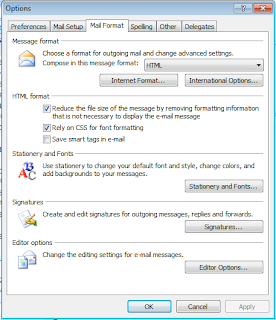
Click the "Signatures" button and in the panel that pops up select New and enter a name.
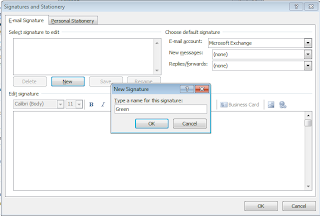
Edit your signature like you would a mail message. Typically you include your name, your position, your company name, and contact information. Add an extra line at the bottom that reads "Do you really need to print this email? Keep it on the screen!". It's a nice touch to highlight that text and colour it green.

When you start a new message you should get your signature automatically.
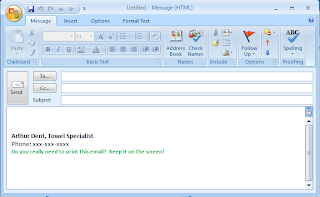
For added bonus points add "Steal this signature!" either on an additional line or in parentheses and link to this blog post (http://scheyeniam.blogspot.com/2010/05/keeping-it-green.html).
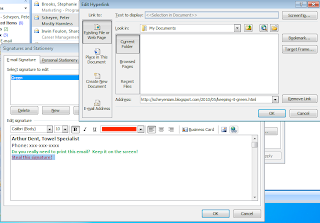
Apple Mail
With Apple Mail in focus open the Preferences under Mail from the Menu or just press Command-,.
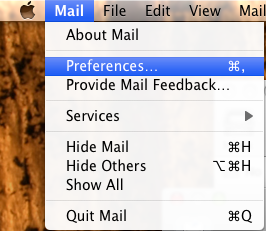
Choose "Signatures" from the Preferences panel.
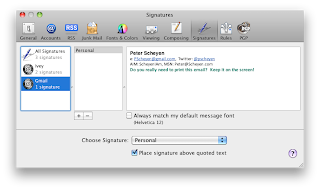
Edit your signature like you would a normal mail message. Typically you include your name, your position, your company name, and contact information. Add an extra line at the bottom that reads "Do you really need to print this email? Keep it on the screen!". It's a nice touch to highlight that text and colour it green (press Command-Shift-C and select the Green of your choice). For added bonus points add "Steal this signature!" either on an additional line or in parentheses and link (by highlighting the text and pressing Command-k) to this blog post (http://scheyeniam.blogspot.com/2010/05/keeping-it-green.html).
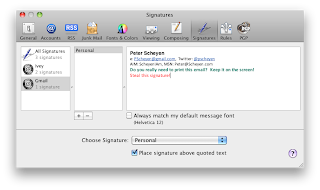
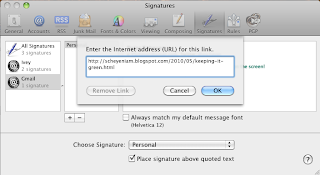
Now when you edit a new message or reply to an existing message your signature will be included automatically. You may want to create multiple signatures for different recipients. Mail makes it easy to select between different signatures while you are composing your message.
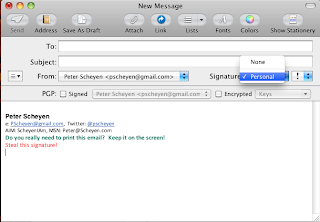
Given this spirit of sustainable business I have recently modified my email signature in order to discourage physical printing of messages that I send.

Notice the last line? It challenges the reader to think first before printing the email. I have absolutely no evidence to suggest that this makes a difference to anyone but I do know that such a message recently gave me pause. Since adding the line at the end of my signature can't hurt and might actually be beneficial I figured I'd jump on the bandwagon.
I really do encourage everyone to do the same. So how do you edit an email signature? Below is a quick synopsis on how to edit signatures using two common email readers: Microsoft Outlook and Mac Mail. Users of other mail readers can use Google for instructions on editing their signatures. Here are some links to relevant Google searches for Google GMail, Mozilla Thunderbird, Microsoft Outlook Express, Microsoft Entourage, Microsoft Hotmail (Microsoft must really want to get email right by trying it 15 different ways).
Microsoft Outlook
First a couple of caveats. One: I'm a Mac. Two: These instructions are for Office 2007.
Start Outlook and Select "Options" from the Tools menu. This will display a set of Options panels. Select the Mail Format tab.

Click the "Signatures" button and in the panel that pops up select New and enter a name.

Edit your signature like you would a mail message. Typically you include your name, your position, your company name, and contact information. Add an extra line at the bottom that reads "Do you really need to print this email? Keep it on the screen!". It's a nice touch to highlight that text and colour it green.

When you start a new message you should get your signature automatically.

For added bonus points add "Steal this signature!" either on an additional line or in parentheses and link to this blog post (http://scheyeniam.blogspot.com/2010/05/keeping-it-green.html).

Apple Mail
With Apple Mail in focus open the Preferences under Mail from the Menu or just press Command-,.

Choose "Signatures" from the Preferences panel.

Edit your signature like you would a normal mail message. Typically you include your name, your position, your company name, and contact information. Add an extra line at the bottom that reads "Do you really need to print this email? Keep it on the screen!". It's a nice touch to highlight that text and colour it green (press Command-Shift-C and select the Green of your choice). For added bonus points add "Steal this signature!" either on an additional line or in parentheses and link (by highlighting the text and pressing Command-k) to this blog post (http://scheyeniam.blogspot.com/2010/05/keeping-it-green.html).


Now when you edit a new message or reply to an existing message your signature will be included automatically. You may want to create multiple signatures for different recipients. Mail makes it easy to select between different signatures while you are composing your message.

Monday, April 26, 2010
Commercialization of the home..
This weekend saw a strange event unfolding in our kitchen as Gabrielle slowly transformed it into a 12'x8'x4' light box. Ok, it was a poor-man's light box. White bed sheets formed the walls. A combination of natural and artificial lights supplied illumination. A USB microphone hung precariously from our overhead kitchen light. So what was she up to? She was filming a commercial for her Communication Tech class.
For those who know Gabby this should not be too surprising. Gabby has been interested for some time now in photography. If you happen to be one of her 21,000 thousand Facebook friends you can check out her portfolio. I find her work enthralling. I've included a couple random samples (it's too difficult to choose favorites) so you can see what I mean (all photos Copyright (C) 2008-2010 Gabrielle Scheyen).
 She recently added video to her set of interests and passions. The subject of the weekend was a remake of a classic Buy a Mac commercial from 2006. After scoping out the house she decided the only place large enough to record the shots for the commercial was the kitchen. So we moved everything out. The Buy a Mac commercials, you may recall, consist of an infinite white backdrop and feature Mac (played by Justin Long) and PC (played by John Hodgman). Since our kitchen is a pale yellow and not pure white, we tacked up a 12'x8' white painters drop sheet and a couple of pure white bed sheets on either side. Thankfully it was an overcast day on Sunday so the sunlight through the screen door was muted and shadows weren't too much of a problem. Once she fiddled with various lights (overheads, lamps, and even a worklight of mine that Annette held up while on a step ladder) the set was ready.
Mac was played by Nathan who sort of has the same laid back hipster look that Justin Long pulls off with ease. Gabrielle was PC-in-disguise complete with trenchcoat and fake mustache. The image here is a test shot for one of the shots. Gabby had all the shots worked out in advance (it never occurred to me that a simple 30 second commercial of two guys talking would have 6 different shots). I was camera man which meant that I pressed record when needed. Annette, as I mentioned, handled being a light post. Avery worked the improvised clap boards to mark the shots.
As director, Gabrielle was in command. Each shot had about 4 to 8 different takes. We did have to reshoot two shots due to equipment problems (ehm, cameraman). Although her original vision was a much higher standard than we could mete out with our stone tools and bear skins she kept us at it until she got the shots she wanted. She and Nathan did a great job remembering their lines and acting our their parts.
The entire shoot from soundstage setup to clean up took about 6 hours. That was the easy part. The project is now in post-production so we won't see the final product for some time. I'm eager to see it though. If it's anything like her other work it'll impress.
For those who know Gabby this should not be too
 surprising. Gabby has been interested for some time now in photography. If you happen to be one of her 21,000 thousand Facebook friends you can check out her portfolio. I find her work enthralling. I've included a couple random samples (it's too difficult to choose favorites) so you can see what I mean (all photos Copyright (C) 2008-2010 Gabrielle Scheyen).
 She recently added video to her set of interests and passions. The subject of the weekend was a remake of a classic Buy a Mac commercial from 2006. After scoping out the house she decided the only place large enough to record the shots for the commercial was the kitchen. So we moved everything out. The Buy a Mac commercials, you may recall, consist of an infinite white backdrop and feature Mac (played by Justin Long) and PC (played by John Hodgman). Since our kitchen is a pale yellow and not pure white, we tacked up a 12'x8' white painters drop sheet and a couple of pure white bed sheets on either side. Thankfully it was an overcast day on Sunday so the sunlight through the screen door was muted and shadows weren't too much of a problem. Once she fiddled with various lights (overheads, lamps, and even a worklight of mine that Annette held up while on a step ladder) the set was ready.
Mac was played by Nathan who sort of has the same laid back hipster look that Justin Long pulls off with ease. Gabrielle was PC-in-disguise complete with trenchcoat and fake mustache. The image here is a test shot for one of the shots. Gabby had all the shots
 worked out in advance (it never occurred to me that a simple 30 second commercial of two guys talking would have 6 different shots). I was camera man which meant that I pressed record when needed. Annette, as I mentioned, handled being a light post. Avery worked the improvised clap boards to mark the shots.
As director, Gabrielle was in command. Each shot had about 4 to 8 different takes. We did have to reshoot two shots due to equipment problems (ehm, cameraman). Although her original vision was a much higher standard than we could mete out with our stone tools and bear skins she kept us at it until she got the shots she wanted. She and Nathan did a great job remembering their lines and acting our their parts.
The entire shoot from soundstage setup to clean up took about 6 hours. That was the easy part. The project is now in post-production so we won't see the final product for some time. I'm eager to see it though. If it's anything like her other work it'll impress.

Tuesday, March 30, 2010
CSM
I took a little flack in the Twittersphere yesterday for linking to an article published by the Christian Science Monitor (CSM). The griefing came not from the content of the article but rather because it was published by CSM.
For those who don't know, the Christian Science Monitor is an international news organization. It publishes a weekly magazine and a news website covering not only U.S. news but also world news. It also happens to be owned by the Church of Christian Science. These are the folks who believe in the healing power of prayer and refuse necessary medical treatment. Not to be confused with Scientology, which is another cult founded by Science Fiction author L. Ron Hubbard and boasts actors Tom Cruise and John Travolta as prominent figures (what a strange world we live in).
Christian Science founder Mary Baker Eddy founded the Christian Science Monitor in the early 1900s (what did we do before Wikipedia?) as a non-religious news agency. The stated CSM principles include a rejection of sensationalism, unbiased fairness, and the idea that news should "bless" and not "injure". The paper is known for its even-handed reporting of major, divisive conflicts such as the Iraq war.
It's this even-handedness that I enjoy most when reading CSM. I find it very difficult to watch CNN and Fox News, for example, because of their pro-American, if-you're-not-with-us, republican biases. Despite being an American news agency, CSM reports on all sides of a story in an unbiased fashion. And that's why it is right under Reuters and CBC in my RSS feed ;-)
For those who don't know, the Christian Science Monitor is an international news organization. It publishes a weekly magazine and a news website covering not only U.S. news but also world news. It also happens to be owned by the Church of Christian Science. These are the folks who believe in the healing power of prayer and refuse necessary medical treatment. Not to be confused with Scientology, which is another cult founded by Science Fiction author L. Ron Hubbard and boasts actors Tom Cruise and John Travolta as prominent figures (what a strange world we live in).
Christian Science founder Mary Baker Eddy founded the Christian Science Monitor in the early 1900s (what did we do before Wikipedia?) as a non-religious news agency. The stated CSM principles include a rejection of sensationalism, unbiased fairness, and the idea that news should "bless" and not "injure". The paper is known for its even-handed reporting of major, divisive conflicts such as the Iraq war.
It's this even-handedness that I enjoy most when reading CSM. I find it very difficult to watch CNN and Fox News, for example, because of their pro-American, if-you're-not-with-us, republican biases. Despite being an American news agency, CSM reports on all sides of a story in an unbiased fashion. And that's why it is right under Reuters and CBC in my RSS feed ;-)
Friday, March 26, 2010
Clarifying Life Change
After sleeping on it I realized the term "yearning" (in my last post) was a little vague. Dreaming, hoping, wishing, pining (for the Fjords!), self-pity are all signs of dissatisfaction. They don't even count as envisioning a change let alone yearning for one. I believe that if you want to manifest change in your life you need to see that alternative future like it's already the present. Not only will that make you open to new opportunity (as I stated in my last post) but it will also change your behaviours (sometimes in ways you don't even realize). Except for my last position change (which was one of those "external events") every promotion I've had started out with me envisioning and then living in that future state. Some changes took longer to occur than others but staying in that target state was key.
Thursday, March 25, 2010
Life Change
I'm really enjoying walking to and from work nowadays. There are many reasons for this including the most significant reason. It provides me with 30 minutes (x2 daily) to just think and not do. That one hour a day split in two segments is among my most creative (maybe I should find a longer route?). On Wednesday afternoon, on the way home, I was thinking about life changes and how difficult they are to achieve. I'm talking about things like going back to school after working for years, changing marital status, starting to have kids, and changing jobs or even careers.
I used to think that life change typically happened for one of two reasons: a significant external event (like getting fired or waking up pregnant) or being somehow unhappy with a situation. The first reason is probably a good case for life change but it is out of your control. The latter case, dissatisfaction, seems like a perfectly reasonable reason to act. But my experience is that dissatisfaction just isn't enough to cause any real change. The brain (at least my brain) plays tricks: Make do. The grass is no greener. You're over-reacting. It really isn't that bad. It'll get better. Lucy couldn't possibly pull the football away again.
These are exactly the thoughts that ran through my head for a long time before I left my last job (it also didn't help that the people I worked with were fabulous). Dissatisfaction was not enough to motivate me to make a life change. In fact, my personality type deals with dissatisfaction by looking for ways to improve the local situation and to remain optimistic that the situation can be improved.
At some point, however, I started to envision what a life change (a job change in this case) might be like. At first it was only an occasional thought. A guilty pleasure. Over time however, the vision of what might be became richer and more detailed. Finally at some point I flipped from imaging a change to yearning for it. At that point, change was no longer an option. It was inevitable.
Not to get all metaphysical here but I am a firm believer in the human ability to create our own reality by envisioning outcomes in advance. I think it pre-wires the brain to be more attuned and receptive to events and subconscious thoughts that lead you to where you want to go. This is why continuously envisioning life changes or goals in richer and richer detail is so important to making real change. And I'm not simply talking about the "Power of Positive Thinking". Obsessively fixating on negative thoughts can also manifest change in your life (but not the good kind). It is also why rejecting negative self-talk is to critical.
So one might argue that envisioning a job change in greater and greater detail motivated me to go find another job. I argue that envisioning that job change in greater and greater detail caused me to change jobs. There's a big difference between the two.
I used to think that life change typically happened for one of two reasons: a significant external event (like getting fired or waking up pregnant) or being somehow unhappy with a situation. The first reason is probably a good case for life change but it is out of your control. The latter case, dissatisfaction, seems like a perfectly reasonable reason to act. But my experience is that dissatisfaction just isn't enough to cause any real change. The brain (at least my brain) plays tricks: Make do. The grass is no greener. You're over-reacting. It really isn't that bad. It'll get better. Lucy couldn't possibly pull the football away again.
These are exactly the thoughts that ran through my head for a long time before I left my last job (it also didn't help that the people I worked with were fabulous). Dissatisfaction was not enough to motivate me to make a life change. In fact, my personality type deals with dissatisfaction by looking for ways to improve the local situation and to remain optimistic that the situation can be improved.
At some point, however, I started to envision what a life change (a job change in this case) might be like. At first it was only an occasional thought. A guilty pleasure. Over time however, the vision of what might be became richer and more detailed. Finally at some point I flipped from imaging a change to yearning for it. At that point, change was no longer an option. It was inevitable.
Not to get all metaphysical here but I am a firm believer in the human ability to create our own reality by envisioning outcomes in advance. I think it pre-wires the brain to be more attuned and receptive to events and subconscious thoughts that lead you to where you want to go. This is why continuously envisioning life changes or goals in richer and richer detail is so important to making real change. And I'm not simply talking about the "Power of Positive Thinking". Obsessively fixating on negative thoughts can also manifest change in your life (but not the good kind). It is also why rejecting negative self-talk is to critical.
So one might argue that envisioning a job change in greater and greater detail motivated me to go find another job. I argue that envisioning that job change in greater and greater detail caused me to change jobs. There's a big difference between the two.
Monday, March 1, 2010
Mardi Gras 2010 - Lundi
I promised myself that I'd use our recent trip to New Orleans as a topic for a blog post but unfortunately it has taken me some time to get around to writing. Anyway, here is Day 1.
Annette wanted to celebrate her recent "milestone" birthday with a party. What bigger party could there possibly be than Mardi Gras? And not just any Mardi Gras but a Mardi Gras after the Saints' Superbowl win.
As we approached the Louis Armstrong airport I couldn't help but marvel at the flatness of the land and the nearness to the water. We've all heard about the flooding after Katrina in 2005 but it isn't until you see the landscape that you understand just how close to disaster the people of New Orleans are constantly. The first glimpses you get during landing are of a treeless landscape painted a thin brown on a blue-grey canvas.
Later that evening we decided to take in our first Mardi Gras parade. For those not familiar with Carnival traditions, the days leading up to Mardi Gras (or Fat Tuesday) are peppered with parties, parades, and other celebrations. The idea is to get out all your bad habits and large living before Ash Wednesday, or the start of Lent and six weeks of fasting and abstinence. Many places around the world (including Quebec, Brazil, Venice) have similar Mardi Gras or Carnival traditions.
In New Orleans, one of the hallmarks are the parades. Parades are put on by Krewes and can range from modest homemade floats to extravagant professionally built floats. It all depends on the means of the various Krewes. Monday evening was the Krewe of Orpheus. Very impressive, elaborate floats. Unfortunately it was miserably cold (around freezing), we hadn't eaten yet, and we had chosen the absolute worst spot to watch the parade -- near the end but not at the end. This meant the parade members were tired and cold but not yet ready to give up the last of their throws. Throws are essential elements of enjoying Mardi Gras parades. Throws can take the form of stuffed toys, plastic doubloons, cups, or beaded necklaces. Beads are the showcase throw that everyone thinks of and parades are definitely one way to acquire them.
Cold, disappointed and near despair, we grabbed a bite to eat (I don't even remember where). Once we had some food and beverages in us the night no longer felt so cold. We went down a block from our hotel and there we found the absolute end of the Orpheus parade route. As my sister Michelle had once told us, the end of a parade route can be a magical place for acquiring throws. It's at the end of the route that the parade members toss their remaining throws off the side of their floats by the handful just to get rid of them. Whole bags of beads went flying past my head. It seems like an odd thing but you get a wonderful sense of inclusion and community getting your first beads (even if they were cheapo, plain plastic beads and not the higher quality types).
Annette wanted to celebrate her recent "milestone" birthday with a party. What bigger party could there possibly be than Mardi Gras? And not just any Mardi Gras but a Mardi Gras after the Saints' Superbowl win.
As we approached the Louis Armstrong airport I couldn't help but marvel at the flatness of the land and the nearness to the water. We've all heard about the flooding after Katrina in 2005 but it isn't until you see the landscape that you understand just how close to disaster the people of New Orleans are constantly. The first glimpses you get during landing are of a treeless landscape painted a thin brown on a blue-grey canvas.
Later that evening we decided to take in our first
 Mardi Gras parade. For those not familiar with Carnival traditions, the days leading up to Mardi Gras (or Fat Tuesday) are peppered with parties, parades, and other celebrations. The idea is to get out all your bad habits and large living before Ash Wednesday, or the start of Lent and six weeks of fasting and abstinence. Many places around the world (including Quebec, Brazil, Venice) have similar Mardi Gras or Carnival traditions.
In New Orleans, one of the hallmarks are the parades. Parades are put on by Krewes and can range from modest homemade floats to extravagant professionally built floats. It
 all depends on the means of the various Krewes. Monday evening was the Krewe of Orpheus. Very impressive, elaborate floats. Unfortunately it was miserably cold (around freezing), we hadn't eaten yet, and we had chosen the absolute worst spot to watch the parade -- near the end but not at the end. This meant the parade members were tired and cold but not yet ready to give up the last of their throws. Throws are essential elements of enjoying Mardi Gras parades. Throws can take the form of stuffed toys, plastic doubloons, cups, or beaded necklaces. Beads are the showcase throw that everyone thinks of and parades are definitely one way to acquire them.
Cold, disappointed and near despair, we grabbed a bite to eat (I don't even remember where). Once we had some food and beverages in us the night no longer felt so cold. We went down a block from our hotel and there we found the absolute end of the Orpheus parade route. As my sister Michelle had once told us, the end of a parade route can be a magical place for acquiring throws. It's at the end of the route that the parade members toss their remaining throws off the side of their floats by the handful just to get rid of them. Whole bags of beads went flying past my head. It seems like an odd thing but you get a wonderful sense of inclusion and community getting your first beads (even if they were cheapo, plain plastic beads and not the higher quality types).
After the parade ended we took a walk down Bourbon Street through the heart
of the French Quarter. It was on this evening that Annette discovered the Handgrenade - a strong drink consisting of rum, gin, vodka, grain
alcohol, and melon liquor served over crushed ice and garnished with mint delivered in a long tube shaped plastic glass with a base shaped like a smiling Allied hand-grenade. They're sold at four locations on Bourbon Street and nowhere else in the world.
Bourbon Street's tenants span a wide spectrum. From upscale hotels and fine restaurants to strip clubs and adult toy stores; and often all in row. Even in the cold that night, Bourbon St. was packed. Music, clubs, people everywhere. The police were also on hand strolling on horseback through the crowds. If people were not in clubs they were in the streets.
And it was on this first night that we learned of the other ways to attract throws (e.g. beads). Whether you were walking the street or waving to the crowd from a balcony, everyone seemed to be in the mood to share their beads. In hindsight it seems quite odd the lengths that some people go to get a bunch of plastic beads. But like many things, I think it's in the acquiring and not necessarily the owning, that attracts.
By about 2am we were pretty tired so we lugged our load of beads back to the hotel. It was amazing to think that we'd only arrived earlier that evening. It was a fantastic feeling to end the day on a high note especially after our rocky start.
Next post... Day 2 (Mardi Gras)
Next post... Day 2 (Mardi Gras)
Subscribe to:
Posts (Atom)